


CF360A/508A Compatible Toner Cartridges: Reliable Color Printing Guide 2026
CF360A/508A Compatible Toner Cartridges: Reliable Color Printing Guide 2026
If you run an HP Color LaserJet Enterprise M553 or M578, you already know the toner bill stings. This is the no-nonsense version of whether compatible 508A cartridges hold up in 2026 — and how to buy them without getting burned.There's a specific kind of frustration that comes with owning an HP Color LaserJet Enterprise. The printer itself is a workhorse — fast, sharp, built for a busy office. Then the "replace cartridge" light comes on, you price a set of genuine 508A toner, and suddenly that workhorse feels expensive to feed.
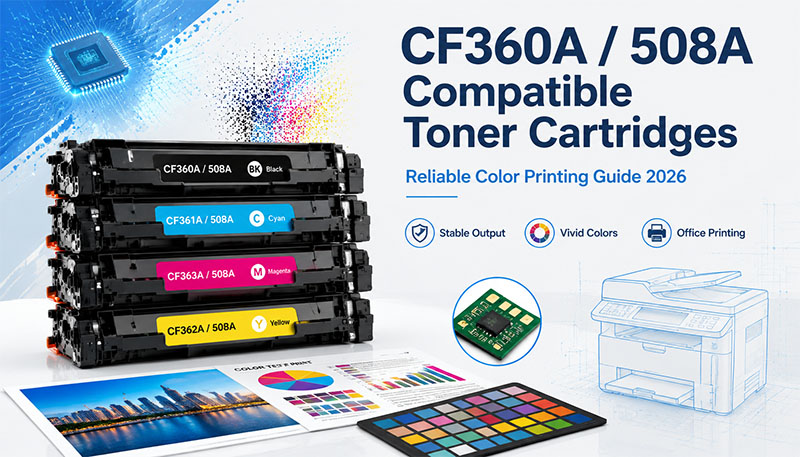
The CF360A is the black cartridge in HP's 508A color series. The full set is four cartridges: CF360A (black), CF361A (cyan), CF362A (yellow), and CF363A (magenta). Together they're what most people mean when they say "508A toner."
I've spent a lot of time this year testing compatible versions of these — partly because the OEM price makes them worth questioning, partly because the compatible market for the 508A series has genuinely changed. The straight answer on reliability, fit, and what you'll actually save is below.
Which Printers Actually Use 508A Cartridges
Before anything else, confirm your model. The 508A series is built for HP's enterprise color line, not the home or small-office lasers:HP Color LaserJet Enterprise M553 — M553n, M553dn, M553x, M553dh
HP Color LaserJet Enterprise MFP M578 — M578a, M578c, M578dn, M578f, M578z
If your printer is an M452, M454, or M255, stop — those take different cartridges (the 410A/415A or 206A series). The 508A is specifically the M553/M578 family. The model number is printed right on the top of your current cartridge, so a five-second check saves you a wrong-order headache.
The Yield Numbers (So You Can Do Your Own Math)
HP rates the 508A at standard yield, and there's also a high-yield 508X if you'd rather refill less often: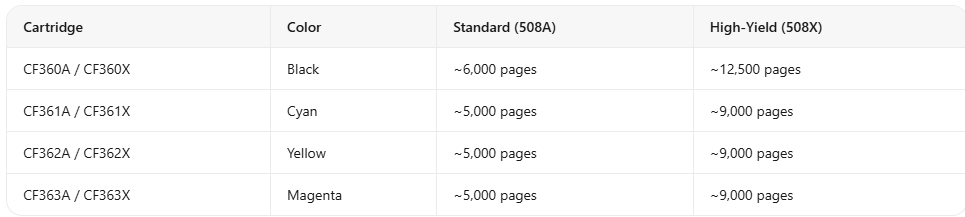
All figures are at 5% ISO coverage — the standard test page, not a full-bleed color brochure. Real-world color documents with heavier coverage will land lower. That's true for OEM and compatible alike, so the ratio holds.
What Changed in 2026: Compatible 508A Got Good
Five years ago, I'd have told you to be cautious about compatible toner in an enterprise machine. The chips were flaky, the color was off, and the yield claims were optimistic at best.That gap has closed. A well-made compatible CF360A/508A in 2026 uses the same chip protocol the printer expects, reports toner level correctly, and doesn't throw a "non-genuine cartridge" fit every time you close the door. The toner formulation sits close enough to OEM on particle size and fusing temperature that the M553's print engine treats it the same.
The catch — and this matters — is that "compatible" covers a huge quality range. A cartridge from an established manufacturer with ISO-certified production is a different animal from a no-name listing with three reviews. More on how to tell them apart below.
The Reliability Question Everyone Actually Asks
Reliability is the real decision factor for the M553/M578, because these are office workhorses, not weekend printers. A streaky page in the middle of a client packet is the nightmare scenario.From what I've seen testing compatible 508A sets this year:
Print quality: On a solid supplier, text is crisp and color blocks are clean. Most people can't tell OEM output from compatible side by side.
Chip behavior: Good compatibles read accurately and don't prompt errors. Cheap ones either don't reset the level display or get rejected after a firmware update.
Yield: Reputable compatible 508A hits 90–100% of the rated page count. Unknown brands often fall short.
The biggest predictor of whether a compatible 508A is reliable isn't the price — it's the supplier. The cartridge is only as good as the company that built it and stands behind it.
Color Accuracy on the M553 / M578
These printers get used for client presentations, branded proposals, and marketing drafts. So color matters more than it would on a mono machine.Honest take: compatible cyan, magenta, and yellow for the 508A series are now close enough for business documents, internal proofs, and everyday color output. Where I still see a gap is in very saturated gradients — a deep blue fading to black, or skin tones in a photo-heavy page. OEM holds those slightly better.
If your business literally sells on color (photography proofs, packaging mockups, brand-critical collateral), keep OEM for those specific jobs. For everything else, compatible is fine. Most offices don't need to split that hair.
How to Pick a Compatible 508A That Won't Fail You
This is the practical checklist I'd give anyone buying these in bulk:Confirm the chip version matches your firmware. HP pushes firmware updates that can block third-party cartridges. Buy from a supplier who states which firmware their chip supports, and don't blind-update your printer.
Look for ISO 9001 / ISO 14001 certification. It's not a guarantee, but it filters out the garage operations.
Check batch consistency in reviews. One good cartridge is luck. Fifty reviewers saying the same thing across months is signal.
Avoid the too-cheap trap. If a full compatible 508A set is suspiciously under market, the drum or toner is where they cut corners. You'll pay for it in streaks.
Ask about the return policy. A supplier confident in their cartridges will replace a dead one without a fight.
Installation: Three Things That Save You a Headache
The 508A install is straightforward, but a few habits prevent the usual problems:
Shake the cartridge gently side to side before installing. Toner settles in shipping; a quick shake evens it out.
Remove every seal strip. The M553/M578 will throw a jam or toner error if a pull-tab is left on. It happens more than people admit.
Don't auto-update firmware. If your compatible cartridges are working, skip the printer's "update available" prompt until you've confirmed the new firmware still accepts them.
If the printer rejects a cartridge after an update, that's almost always a chip/firmware mismatch, not a dead cartridge. A reset chip or a supplier who ships firmware-current chips fixes it.
What You Actually Save Versus OEM
This is the part that drives the whole conversation. Typical 2026 retail ranges:OEM 508A full set (4 cartridges): roughly 850–1,100
Compatible 508A full set (4 cartridges): roughly 210–360
That's about 65–75% less per replacement cycle — with comparable yield.
For an office running a few M553s through steady color volume, that difference is thousands per year, not hundreds. If you want the full cost-per-page math across other HP and Brother models, our earlier breakdown covers it in detail.
And before someone asks — no, refilling these isn't the move. The 508A shell and chip make it more trouble than it's worth. Here's what actually happens when you try.
FAQ
Will using compatible CF360A/508A cartridges void my printer warranty?
No. Under the Magnuson-Moss Warranty Act, HP can't void your printer's warranty just because you used a third-party cartridge. They can deny a claim only if they prove the cartridge directly caused the damage — which is rare with quality compatibles.
Why does my M553 say "non-HP cartridge installed"?
That's a notification, not an error. The printer detects the chip isn't OEM and flags it. Printing continues normally. If it actually blocks printing, that's usually a firmware update that blacklisted third-party chips — see the install notes above.
Can I mix OEM and compatible cartridges?
Yes. The printer treats each cartridge independently. Plenty of offices run OEM black with compatible color, or vice versa, depending on which they print most.
My printer stopped recognizing the cartridge after an update. Now what?
Roll back the firmware if your model allows it, or get a replacement chip matched to the current firmware from your supplier. Going forward, don't accept silent firmware updates on a printer that runs compatible toner.
The Bottom Line
Compatible CF360A/508A cartridges are reliable in 2026 — provided you buy from a supplier that makes them properly. The print quality is close enough for virtually all business color work, the chips behave, and the savings versus OEM are real and large.The risk isn't the cartridge type. It's the seller. Vet the supplier, skip the firmware auto-updates, and the M553/M578 will run on compatible 508A toner exactly as intended — at a fraction of the cost.
Buy one compatible black (CF360A) and one color, run them through a normal week, and decide from your own pages. That's a cheaper experiment than guessing.


